Textra SMS
- 4.2
- Rating
- 10.00M
- Installs
- Free
- Price

 Analysis by App-foxy
I spend a surprising amount of time in messaging apps, so I notice quickly when one makes ordinary texting feel slower or more complicated than it needs to be. Textra SMS takes a focused approach: it is a communication app built around SMS and MMS, rather than a social network or an internet-first messenger. After using it as a practical replacement for a standard texting app, I found its strongest quality to be control. It gives everyday conversations a cleaner, more adjustable home without asking me to learn an entirely new way to communicate.
That focus also explains its limits. Textra SMS is not a universal answer for group chats, encrypted conversations, video calls, or messaging people who do not use the same service. Its value depends heavily on how much you still rely on carrier-based texting and how much you care about customizing that experience. For the right user, it feels like a meaningful upgrade to a familiar tool. For someone who has moved almost entirely to internet messaging platforms, it may add little.
What Textra SMS actually changes about everyday texting
At its core, this is an SMS and MMS replacement from Delicious. That sounds modest, but it matters because the app does not try to turn a simple text into a sprawling communication hub. I can open a conversation, read the thread, reply, and send media without navigating through a feed, a marketplace, or unrelated social features. The experience stays centered on people I already contact through my phone number.
You May Also Like

 Blood Strike: 2.5 Anniversary
Blood Strike’s Loadouts Turn Every Drop Into a Tactical Gamble
A close look at Blood Strike’s custom loadouts: how fast access to signature weapons reshapes its battle royale rhythm, rewards preparation, and narrows the gap between fights.

 Pandora - Music & Podcasts
Pandora’s Music Is Easy to Start, but Harder to Recover
Pandora’s strength is its low-effort path from a seed to a station. Its weak spot is how much confidence it asks you to place in connection, setup, and quiet recovery.

 8 Ball Pool
 Is Built on Rivalries, Rematches, and Routine
A close look at the rivalries, rematches, shared routines, and unanswered safety questions that turn a quick pool match into a persistent mobile community.

 Samsung Music
’s Quiet Strength Is Playing What You Already Own
Its reach comes less from spectacle than from dependable access to a personal library. That simplicity is both the app’s strongest retention engine and its ceiling.

 AccuWeather: Weather Radar
AccuWeather Review: A Quick, Clear Forecast for Everyday Decisions
For everyday plans, the best forecast is the one you can understand quickly. AccuWeather makes rain timing, radar, and local conditions easy to act on, with a few trade-offs.

 Hill Climb Racing
Why Hill Climb Racing Still Turns Crashes Into One More Run
A tiny car, a bumpy hill and one more upgrade: Hill Climb Racing keeps resurfacing because its simple chaos makes every near-miss feel personal.
More From Our News Desk



The store summary describes it as beautiful, fast, and feature-rich, and I think the useful part of that promise is the balance between speed and personal control. The interface is designed to make frequent actions easy to reach, while appearance and conversation behavior can be adjusted more than they usually are in a basic phone messaging app. The result is less about discovering new content and more about making an old communication habit fit me better.
That distinction is important when comparing it with alternatives. A default messaging app is usually adequate and may be tightly integrated with the phone. Internet-based services can offer richer group conversations, calls, stickers, and cross-device experiences. Textra sits between those choices: it improves the SMS and MMS layer without replacing the people, phone numbers, or carrier system behind it.
The cost is straightforward, but the value depends on your habits
The app is free to install and use, which makes testing it relatively easy. There is also an in-app purchase priced at $9.99 per item. I would treat that as an optional value decision rather than an entry fee: the free access lets me judge whether the interface and workflow genuinely improve my texting before spending anything.
That distinction prevents a common mistake. A free download is not automatically a good bargain if I rarely send SMS or MMS. Conversely, a paid option can make sense when I use texting throughout the day and want the app to feel more personal over a long period. I would not pay simply because the app has many settings; I would pay only after identifying the particular adjustments I use often enough to justify it.
The purchase is therefore best evaluated against frequency, not against the price of competing messengers. If most of my conversations happen in an internet-based service, the free version may be all I need for occasional carrier messages, and paying may not add enough practical value. If texting is my main way to coordinate with family, work contacts, delivery drivers, schools, or local services, the ability to make that routine more comfortable can be worth considering.
Where the app delivers real value
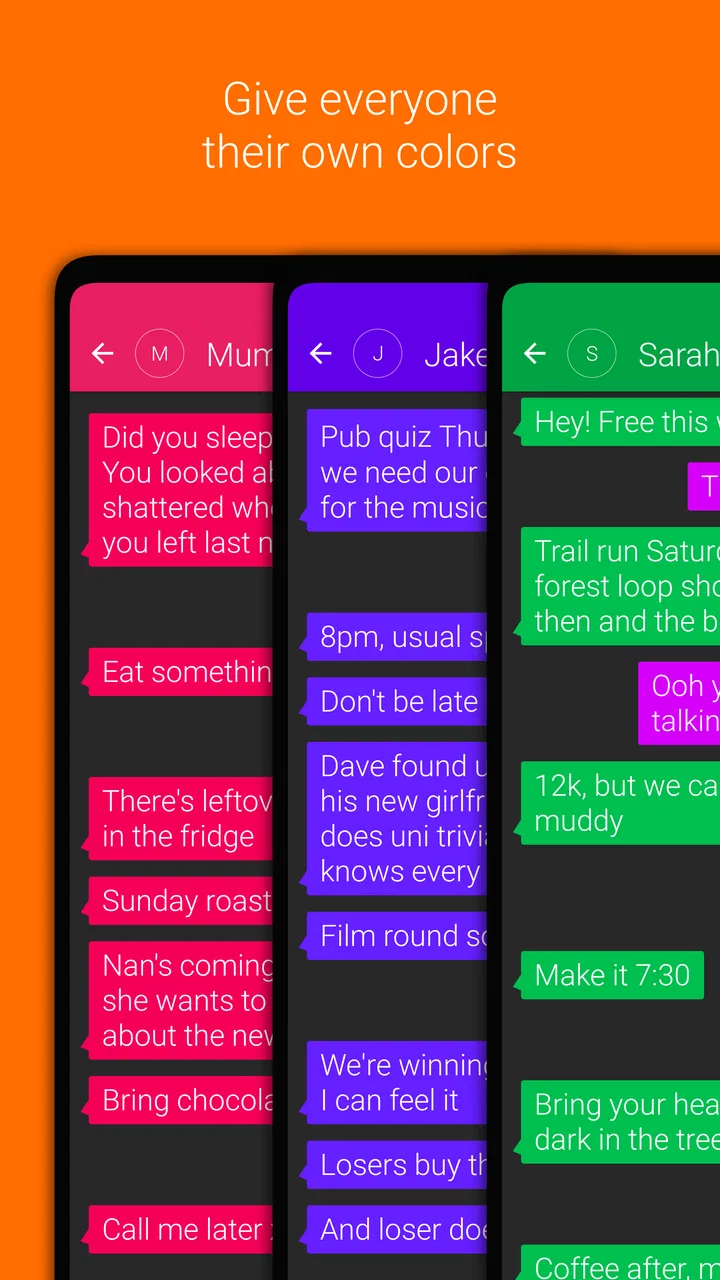
The biggest improvement is consistency. A stock messaging app may work perfectly well, but its design can feel like something I have to accept rather than something I can shape. Textra SMS gives me more room to make conversations visually distinct and to tune the way messages behave. That is especially useful when I handle many threads and need to recognize the right conversation quickly.
One practical scenario is a busy weekday when I am coordinating a pickup, answering a family message, and keeping up with a work-related text thread. I do not need another social destination; I need an inbox that lets me identify conversations, respond without friction, and avoid losing important details among casual messages. A dedicated SMS app can make that routine feel more deliberate than a barebones default client.
Another advantage appears when a phone’s built-in messenger feels visually cluttered or restrictive. Rather than changing my communication habits, I can keep using the same phone numbers and contacts while changing the layer through which I read and send messages. That lower disruption is one of the app’s strongest arguments. I am not asking every contact to install something, create an account, or move to a new platform.
Its support for both SMS and MMS also keeps it useful for ordinary media exchanges. I can stay within the same conversation model when a message includes more than plain text. That is not the same as the richer media handling found in modern internet messengers, but it is convenient for contacts who still communicate through the carrier network.
Small workflow decisions make a bigger difference than the headline features
One non-obvious strength is that customization can be used functionally rather than decoratively. I would not change colors and conversation settings just for novelty. I would use visual differences to make frequent threads easier to scan, reserve a calmer appearance for long conversations, and reduce the mental effort of identifying where a new message belongs. The best setup is the one that helps me act faster, not the one with the most dramatic theme.
A second useful insight is to treat the app as a communication filter. Because it is focused on SMS and MMS, it can help separate phone-number conversations from the constant stream of internet services. That separation is valuable for people who want texting to remain a simple utility. It is less useful for anyone who wants all messages, calls, reactions, and shared media collected in one account-based inbox.
A third trade-off concerns compatibility. Textra can improve the experience on my side, but it cannot turn SMS into an encrypted modern messenger or give every recipient the same interface. The other person still receives a carrier message through their own app or service. That means the app’s customization is largely personal: it improves how I manage the conversation, not necessarily how the recipient sees it.
I also found that a replacement messaging app deserves a little patience during setup. The important question is not whether the first screen looks attractive; it is whether the app becomes the dependable default for opening and responding to texts. I would test it during normal use, including a conversation with media and a thread that receives frequent replies, before deciding whether its workflow is genuinely better than the phone’s original option.
Trade-offs that should shape your decision
The clearest limitation is that SMS and MMS remain SMS and MMS. Their usefulness depends on carrier support, phone numbers, and the broader limitations of that system. Textra does not remove those constraints. If I need end-to-end encryption, advanced collaborative group tools, reliable high-quality media sharing, or seamless messaging across several device types, I would look at a specialized internet messenger instead.
There is also a risk of over-customization. The app offers enough control to make the experience feel personal, but every extra adjustment creates another decision. A person who wants texting to work exactly like the default app may find the additional options unnecessary. In that case, the built-in messenger has a real advantage: it is already present, familiar, and usually requires no migration in daily behavior.
Group conversations are another area where expectations matter. Textra can handle the SMS and MMS style of communication, but that should not be confused with the modern group-chat experience offered by services designed around internet accounts. If a group relies on reactions, shared files, calls, message editing, or a consistent experience for everyone, a dedicated online platform is likely the better choice.
I would also avoid judging the app solely by visual polish. A beautiful interface is pleasant, but the important test is whether messages arrive, notifications fit my routine, and sending works reliably with the people I actually contact. Those practical details are influenced by the phone, carrier, and recipient setup as well as by the app itself. Textra can make the client better; it cannot control every part of the delivery chain.
Who is most likely to get their money’s worth
I think Textra SMS is a strong fit for someone who still sends regular carrier texts and feels that the default messaging experience is too plain, rigid, or difficult to scan. It is also a sensible choice for people who want to change their own texting environment without persuading friends and relatives to join another service. The free entry point makes that evaluation uncomplicated.
It can be particularly useful for a person who manages several recurring conversations every day. Family coordination, appointments, school communication, local businesses, and contacts who do not share the same messaging platform are all situations where SMS remains practical. In those cases, a more adjustable client can improve the routine without changing the underlying communication method.
I would be more cautious if my messaging life is almost entirely inside internet-based services. If I mainly need calls, encrypted chats, large media transfers, synchronized conversations across devices, or active group communities, Textra is not the tool I would choose first. It may still be useful for occasional texts, but its central advantage would sit outside my main needs.
The app is marked for Everyone, which fits its straightforward communication purpose. It is also an established product: it was released on May 20, 2013, and its current version is 4.85. On compatible devices, the minimum operating system is Android 8.1. Those details matter when I am considering an older phone or deciding whether a device can run the current release comfortably.
What its popularity tells me, and what it does not
Textra SMS has an average rating of 4.2 from around 438 thousand ratings, with roughly 116 thousand written reviews. It has passed 10 million installs, which suggests that the idea of a dedicated, customizable texting client has broad appeal. I read those numbers as evidence of a mature audience rather than proof that every phone and carrier combination will behave identically.
The developer, Delicious, has kept the product focused on a familiar communication task instead of turning it into a general-purpose social platform. That focus is reassuring for someone who wants a replacement for the standard SMS app, but it also means the app should be judged on messaging fundamentals rather than on the breadth of a full communication ecosystem.
My buy-or-skip verdict
I would recommend trying Textra SMS if your daily communication still depends on SMS and MMS and you want more control than your phone’s default client provides. The free access is enough to test the central experience, and the optional $9.99 purchase should be considered only after the app has become part of your routine. In my view, the strongest value comes from repeated small improvements: easier scanning, a more comfortable appearance, and a texting workflow that feels chosen rather than imposed.
I would skip it if I am looking for a complete replacement for modern internet messaging. It is not the right answer for someone whose priorities are encrypted conversations, advanced online groups, calls, or a shared platform that every participant uses. In that situation, a purpose-built internet messenger will deliver more relevant value, even if it offers less control over traditional SMS.
For everyone in between, my advice is simple: install it, use it during a normal week, and pay attention to whether you actually respond faster or feel less friction when managing conversations. The real value is not the number of settings; it is whether those settings make everyday texting easier for you. If they do, Textra SMS is a worthwhile free replacement with an optional paid path. If they do not, the default app is probably the better choice because changing messaging clients would add complexity without solving a real problem.
FAQs for Textra SMS
01What features make Textra SMS stand out from other messaging apps?
Textra SMS offers a range of customization options, including over 180 material design theme colors, bubble and icon color choices, and font styles. It supports GIFs, animated emojis, and has a quick reply popup. Additionally, Textra SMS is known for its fast performance and efficient battery usage, making it a favorite among users.
02Does Textra SMS support group messaging and multimedia messages?
Yes, Textra SMS fully supports group messaging and multimedia messages (MMS). You can easily send and receive texts, photos, videos, and audio messages. The app also offers advanced features like scheduling messages, which is a great option for planning group communications ahead of time.
03Is Textra SMS compatible with all Android devices?
Textra SMS is compatible with most Android devices running Android 4.1 and above. Whether you have a flagship device or an older model, Textra is designed to function smoothly across various hardware configurations, ensuring a seamless messaging experience for all users.
04How does Textra SMS handle privacy and security?
Textra SMS respects user privacy by not collecting unnecessary personal data. It does not store your messages on its servers, which means your conversations remain private. The app also allows you to set password protection for additional security, giving users peace of mind about their data.
05Are there any costs associated with using Textra SMS?
Textra SMS is free to download and use, offering a robust set of features without any charge. However, there is an optional in-app purchase to remove ads, which is a one-time payment. This upgrade enhances the user experience by providing an ad-free environment while supporting the developers.
Pros
- Highly customizable interface.
- Supports various emoji styles.
- Fast and efficient performance.
- Integrates easily with other apps.
- Offers a wide range of themes.
Cons
- Contains in-app ads.
- Limited free features.
- No cloud backup option.
- Occasional notification delays.
- Premium features require payment.

Textra SMS
Gallery